To search
Softonic Rating:
Very good810
License:
Free
Added:
August 24, 2007
Publisher:
Website
File size:
1.9 MB
Downloads:
1,940
Elena Santos

“Customize folder icons easily”

by Elena Santos

Are you tired of all those identical yellow folders? Install MyFolder and pimp up the standard Windows file manager by customizing your folders' appearance. This program makes it easy and fun!

You can select the folder's new color either directly in MyFolder interface or by selecting the correspondent option in the folder's context menu. This second option is probably more comfortable, because when working from the interface you have to manually select each folder. I think this could be improved by allowing users to open several folders at the same time and then apply their chosen icons separately to each one of them.

The program includes a nice choice of new folder icons, including variations in color and also some special icons to mark folders as important, private, favourite and so on. The good thing is that you can add your own icons to the program's library.

Languages:

English

OS requirements for MyFolder:

  • OS: Win2000/XP
Pros
  • Includes eye-catching new folder icons
  • Allows you to customize folder from context menu
  • Allows you to add new icons to library
Cons
  • Changing icons from the interface can be tiring
Did you like this review?
1 of 2 users liked it (50%)

Featured program

Softonic gives special recognition to software of exceptionally high quality. More information

From the publisher of MyFolder

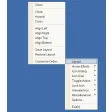
Click on a folder with the right button of the mouse and change the folder icon by My Folder. By clicking right button of the mouse on the folder; you can reach all the galleries those defined submenu under Horizon Myfolder Menu.

Appearance of the any icons listed can be changed. Changing shape and color of the folders makes easier and faster Windows. Appearance of the folders is up to your choice by My Folder
Customize your computer by My Folder. Resetting and getting back to original icon is possible. Adding new icon and changing the look of the folders are possible.

Folder icons can be stored as many as wanted under My Folder gallery section. You can create particular icon library and control the icons by My Folder Icons defined in My Folder library can be transferred to the galleries in gallery section. My Folder provides adding folders with dll. exe. and icl. extensions to the library.

MyFolder options

MyFolder Options

Reviews for MyFolder in other languages

Softonic Rating:Very good
10/10

User Rating

1 rating
Usability
  • Currently 10/10.
Stability
  • Currently 10/10.
Installation
  • Currently 10/10.
Functionality
  • Currently 10/10.
Appearance
  • Currently 10/10.

Download stats

Related

Related searches

Are you the developer of MyFolder?

If your program has received a Softonic rating, feel free to use the following award badge on your site or as part of any other promotional feature you may be putting together.

MyFolder Softonic Rating

Click on the above text field to copy the necessary HTML to your clipboard and then paste it to your website. It will display your program's Softonic Rating and will link to your program page.

Any queries? Contact us if you want more info.

Close